Annual Report Design: A Practical Guide to Professional Document Production
An Annual Report is more than a collection of financial figures; it is a strategic communication tool that defines the narrative of an organization over a specific period. For professionals, entrepreneurs, and small business owners, creating this document often represents a critical juncture in the fiscal year. It serves as a bridge between raw data and stakeholder understanding, requiring a balance of rigorous accuracy and compelling visual storytelling. The process of producing a high-quality Annual Report involves careful planning, precise execution, and the use of robust design systems that ensure consistency across every page.
In the context of modern digital publishing, the efficiency of your workflow determines the quality of the final output. A well-structured template or design system can transform a daunting 32-page project into a manageable, streamlined process. This approach allows creators to focus on content refinement rather than getting bogged down in formatting details. By leveraging pre-configured elements such as master pages, paragraph styles, and color swatches, teams can maintain brand integrity while significantly reducing production time.
The Role of Structure in Document Creation
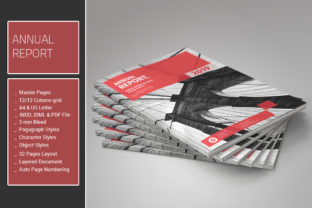
Before a single word is typed or a chart is inserted, the foundation of the Annual Report must be established. This phase is about defining the architecture of the document. In professional desktop publishing, specifically within Adobe InDesign, this architecture relies heavily on the use of Master Pages. These are the blueprints that dictate where headers, footers, page numbers, and recurring graphical elements appear. When a template includes comprehensive Master Pages for both A4 and US Letter sizes, it ensures that the document adapts seamlessly to different regional printing standards without requiring manual reformatting.
The implementation of a grid system is equally vital. An Annual Report aligned to a 12-column grid offers exceptional flexibility. Unlike rigid layouts, a 12-column structure allows designers to create complex, asymmetrical compositions that guide the reader's eye naturally through dense information. Whether placing a full-width quote, a narrow column of text, or a balanced two-column layout for financial tables, the grid acts as an invisible scaffold. This structural consistency is what gives a professional report its polished look, even when the content varies wildly from section to section.
Leveraging Styles for Consistency and Efficiency
One of the most common pitfalls in document creation is inconsistency. Font sizes may drift, spacing might vary, and colors could shift slightly between pages. To combat this, professional workflows rely on Paragraph Styles, Character Styles, and Object Styles. These tools allow you to define a set of rules once and apply them globally throughout the entire 32-page document.
When working with an Annual Report template that includes these styles, the editing process becomes remarkably efficient. If a client decides that the body font needs to change from one typeface to another, or if the heading color needs to be adjusted to match a new brand identity, the update is instantaneous. You simply modify the style definition, and the change propagates to every instance in the document. This level of control is essential for maintaining quality assurance during the review and revision phases.
Color management is another area where pre-defined swatches play a crucial role. A good template provides a dedicated palette of color swatches designed for simple editing. This means that instead of manually picking hex codes for every element, you select from a curated list that ensures harmony. Should the brand guidelines evolve, updating the primary swatch automatically refreshes all associated objects, charts, and infographics. This interconnectedness reduces the risk of human error and ensures that the visual language remains cohesive from the cover to the back matter.
Integrating Data and Visual Assets
The core of any Annual Report is the data itself. This typically includes balance sheets, income statements, and cash flow reports. Presenting this information clearly is a challenge that requires specialized table designs. A robust template will include pre-formatted tables ready for Quote Balance Sheet data. These tables are not just grids; they are designed with appropriate padding, alignment, and typography to make large datasets readable at a glance.
Beyond raw numbers, visual engagement is key. Vector infographics and icons serve as powerful tools to break up text-heavy sections and illustrate trends. Because these assets are vector-based, they remain crisp at any resolution, whether the report is viewed on a high-density mobile screen or printed on glossy paper. The inclusion of .IDML (InDesign Markup Language) files alongside standard .INDD files further enhances usability. IDML files act as a universal translator, allowing older versions of InDesign to open files created in newer versions, ensuring that compatibility issues do not stall the production timeline.
It is important to note that many professional templates do not include photographs. This is a deliberate design choice. Stock photos can sometimes feel generic or disconnected from a company's specific story. By omitting photos, the template encourages users to insert their own authentic imagery, ensuring that the final product feels personalized and genuine. This approach places the responsibility of visual storytelling on the content creator, who knows best which images truly represent their organization's achievements.
Workflow Integration and Compatibility
For freelancers, publishers, and marketing teams, software compatibility is a non-negotiable factor. The landscape of desktop publishing has evolved rapidly, but many organizations still operate on legacy systems. A versatile Annual Report template should be compatible with a wide range of Adobe InDesign versions, including CS4, CS5, CS5.5, CS6, and Creative Cloud (CC). This broad compatibility ensures that the asset can be used by diverse teams without requiring expensive software upgrades.
The inclusion of downloadable PDF files provides an immediate preview of the design capabilities, allowing stakeholders to visualize the final product before committing to the edit. Furthermore, the presence of free fonts in the package removes the barrier of licensing costs. Using free, open-source typography allows small businesses and startups to produce enterprise-level reports without incurring additional expenses for font licenses. This accessibility democratizes high-quality design, making it available to a wider audience of creators and entrepreneurs.
Practical Implementation Strategies
To integrate an Annual Report template effectively into your workflow, begin with a thorough audit of your content. Gather all financial data, executive summaries, and strategic narratives before opening the InDesign file. Organize these materials into logical sections that align with the template's structure. This preparation minimizes the need for major structural changes later in the process.
Once the content is ready, utilize the Master Pages to lock down the layout framework. Apply the predefined Paragraph and Character Styles to your text immediately. Resist the temptation to manually format individual paragraphs, as this breaks the link to the styles and complicates future updates. Use the Object Styles to manage frames, lines, and graphic elements consistently. This disciplined approach ensures that the document remains editable and flexible throughout the review cycle.
When inserting data into the tables, double-check the alignment and numerical formatting. Ensure that the vector infographics are scaled appropriately within the 12-column grid. Because the template uses a modular grid, resizing elements should snap into place, maintaining alignment with other page components. Finally, leverage the color swatches to apply your brand identity. If the default colors do not match your brand, update the swatch names and values first, then let the styles handle the rest.
Long-Term Value and Quality Control
The value of a well-designed Annual Report extends beyond the current fiscal year. The skills and systems learned during its creation can be applied to future projects, such as quarterly reviews, investor decks, or annual brochures. By mastering the use of styles, grids, and master pages, you build a reusable asset library that accelerates future production cycles.
Quality control is maintained through the very structure of the template. Because every element is linked to a central style or swatch, inconsistencies are easily spotted and corrected. The clean, organized nature of the file makes it easier for multiple team members to collaborate without stepping on each other's toes. Whether you are a solo freelancer managing multiple clients or part of a large corporate team, the ability to produce consistent, high-quality documents efficiently is a competitive advantage.
Ultimately, the Annual Report is a testament to an organization's transparency and professionalism. By utilizing a robust, feature-rich template that supports A4 and US Letter formats, offers extensive styling options, and ensures cross-version compatibility, you empower yourself to deliver a document that meets the highest standards. This approach transforms a routine administrative task into a strategic opportunity to communicate vision, performance, and future potential with clarity and impact.